Postingan

Menampilkan postingan dengan label Power series

Notifications from the Twitter app are easier on your battery
Gambar
This blogpost is a collaboration between Google and Twitter. Authored by Jingwei Hao with support from César Puerta, Fred Lohner from Twitter, and developed with Jingyu Shi from Google. Push notifications are an important way to keep Twitter users informed about what's happening. However, they can be a significant and often overlooked source of battery drain. For example: high priority notifications can wake a phone from Doze , and fetching data upon push notification delivery via the network can drain the battery quickly. As app developers at Twitter, we know that battery life is an important aspect of the mobile experience for our users. Over time we've taken several steps to optimize our app to work with the power saving features, particularly around push notifications. In this article, we'll share what we did to save battery life on our users' devices in the hope this will help other developers optimize their apps as well. Firebase Cloud Messaging migration Earlier...
Effective foreground services on Android

Gambar
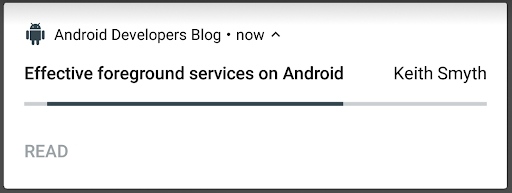
Posted by Keith Smyth This is the fourth in a series of blog posts in which outline strategies and guidance in Android with regard to power. A process is not forever Android is a mobile operating system designed to work with constrained memory and battery. For this reason, a typical Android application can have its process killed by the system to recover memory. The process being killed is chosen based on a ranking system of how important that process is to the user at the time. Here, in descending order, is the ranking of each class of process. The higher the rank, the less likely that process is to be killed. Native Native Linux daemon processes are responsible for running everything (including the process killer itself). System The system_server process, which is responsible for maintaining this list. Persistent apps Persistent apps like Phone, Wi-Fi, and Bluetooth are crucial to keeping your device connected and able to provide its most...

Modern background execution in Android

Gambar
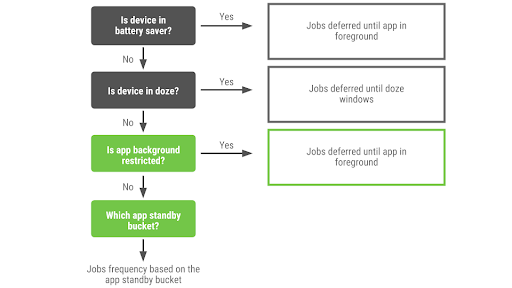
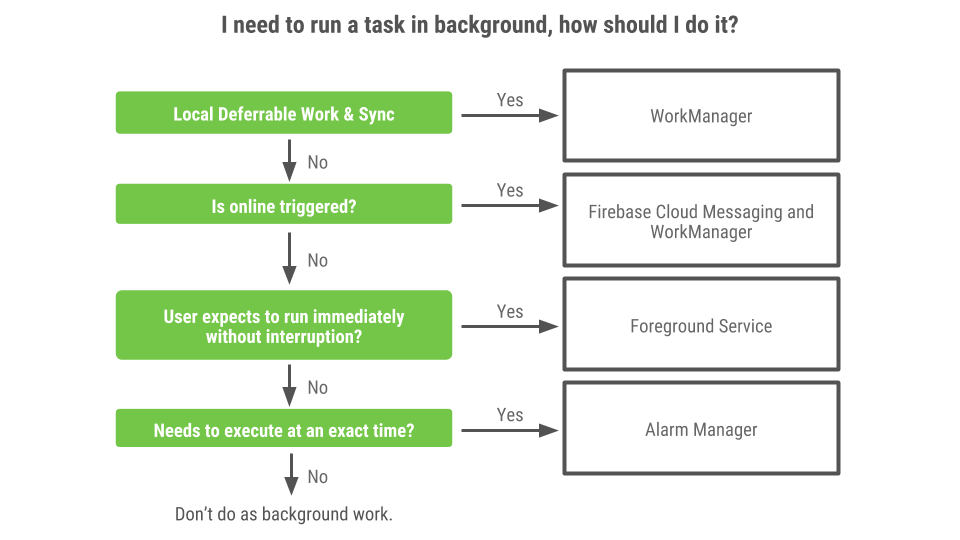
Posted by Luiz Gustavo Martins, Partner Developer Advocate, Partner DevRel This is the third in a series of blog posts in which outline strategies and guidance in Android with regard to power. Over the years, executing background tasks on Android has evolved. To write modern apps , it's important to learn how to run your background tasks in modern fashion. When is an app in the background? Before understanding what background execution is, we need to have a clear view of when Android understands an app to be in the foreground. An app is considered to be in the foreground if any of the following is true: The app has a visible activity, whether the activity is started or paused. The app has a foreground service . Another foreground app is connected to the app, either by binding to one of its services , or using one of its content providers . For example, an app is in the foreground if another app or the system binds to its: IME Wallpaper service Notification listener Voice or te...

Notifying your users with FCM

Gambar
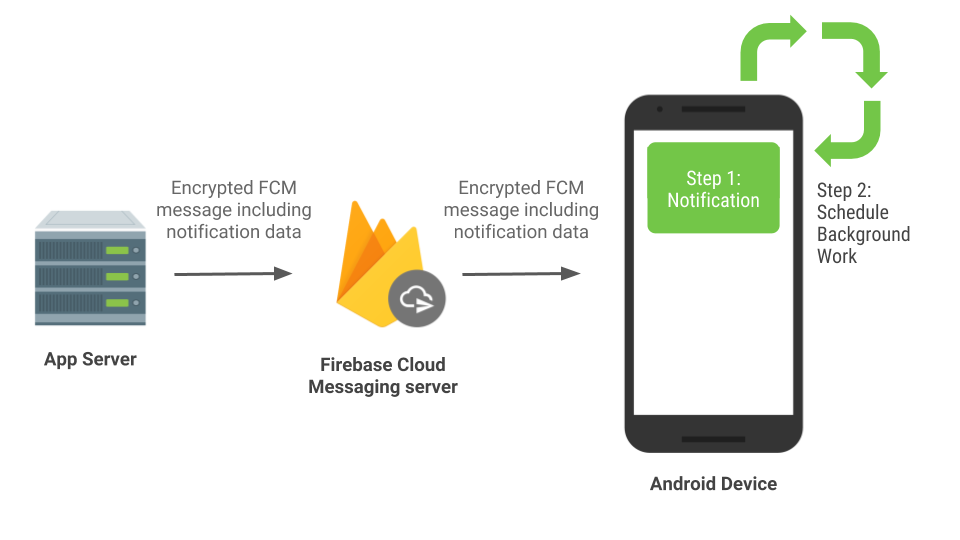
Posted by Jingyu Shi, Partner Developer Advocate, Partner DevRel This is the second in a series of blog posts in which outline strategies and guidance in Android with regard to power. Notifications are a powerful channel you can use to keep your app's users connected and updated. Android provides Notification APIs to create and post notifications on the device, but quite often these notifications are triggered by external events and sent to your app from your app server. In this blog post, we'll explain when and how to generate these remote notifications to provide timely updates to users and minimize battery drain. Use FCM for remote notifications We recommend using Firebase Cloud Messaging (FCM) to send remote notifications to Android devices. FCM is a free, cross-platform messaging solution that reliably delivers hundreds of billions of messages per day. It is primarily used to send remote notifications and to notify client applications that data is available to sync. If y...

Moar Power in Android 9 Pie and the future

Gambar
Posted by Madan Ankapura, Product Manager, Android This is the first in a series of blog posts that outline strategies and guidance in Android with regard to power. Your users care a lot about battery -- if it runs out too quickly, it means they can't use your apps. Being a good steward of battery power is an important part of your relationship with the user, and we're continuing to add features to the platform that can help you accomplish this. As part of our announced Play policy about improving app security and performance, an app's target API level must be no more than one year older than the current Android release. Keeping the target API level current will ensure that apps can take advantage of security and performance enhancements offered in the latest platform releases. When you update your app's target API level, it's important that you evaluate your background and foreground needs, which could have a significant impact on power & performance. Past ...